Posts

HTML JavaScript and CSS Cheat Sheets

Image
Programmers who use many programming languages often forget even the most common syntax they use every day. To be honest, I don't remember exactly how to write a for loop because it's always easier to look up on W3 Schools or on Stack Overflow the exact code. It just takes a quick Google search and there will be no error for sure. I'm glad to present today the new Cheat Sheet for web developers which has a separate page for HTML , CSS and JavaScript . A screenshot from the CSS page.

Online Windows XP simulator prank

Image
April Fools' Day is approaching and you might need some new ideas of how to prank your friends. A classic office prank is when someone takes a screenshot of the others desktop and opens the image full screen, making the other believe that his computer is frozen. The only downside of this prank is that people quickly realize what's going on and they close the window. In this article I want to present a more effective way of a similar prank where people can actually interact with the screenshot. Geek Prank is an online old Windows XP simulator people can interact with, making the scenario more real, not like a simple frozen image.

Free online Word Doc to HTML converter, the new WordOff

Image
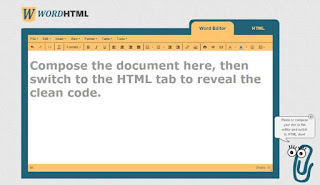
We'd like to introduce a new free online tool which can be used to convert not only the Microsoft Word documents but any other rich text document to a syntactically valid HTML code. Use this tool for Google docs, Excel, PDF or anything you can imagine. The site is hosted on WordHTML.com and it's definitely worth using every time to avoid the huge mess the Word editor adds every time to our markup. Word to HTML converter

The Most Ugly Website On The Net Listing Bad Web Design Practices

Image
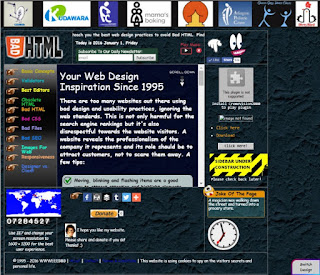
In the first blog article of the New Year we'd like to present a funny topic, the ugliest website of the Internet . The creators of BadHTML.com want to raise awareness for all the bad web practices we can find on so many websites.

HTML G - The best online HTML Editor Toolkit

Image
Nowadays you don't have to know HTML code editing , even if you are a blogger or you publish web articles regularly because almost every CMS has its own built-in editor interface which does the work for you. You rely on your composer and never check the code behind your website, however you should do. The new HTML Editor

How to convert HTML tables to structured DIV elements

Image
This short video explains how to convert HTML tables to divs. Find out how we used tables in web design to position sections on the webpage and how we used it to layout whole websites. Learn why are tables outdated and why should they be replaced by DIVs and how.

The Best Online HTML Editor

Image
The best free online WYSIWYG HTML code editor you can find today is hosted by www.HTML-Online.com/Editor . This is the most user-friendly web-based code creator to compose website content without downloading any application. All you need is a web browser and you can start using this rich text editor without registration or paying any subscription fees.

Online HTML editor

Image
Let me present the witch of the HTML editing. A website recently lauched featuring an online HTML editor. We highly recommend using this amazing online tool because it makes web content editing a piece of cake. Despite its amazing features it's completely free and there's no need to register either. Just open it in your web browser and start composing your text. When you visit the site for the very first time it populates the editor with a demo text which allows you to try all features of the online tool. Click the HTML Editor witch to visit the site. Online HTML Editor

Website launch checklist

Image
You need to be cautious launching a fresh website, especially when you replace an existing site with high traffic. Regardless if you are using a staging site or not the goal is to avoid or minimize downtime and to make sure you didn't forget anything. For this I have put together a list I always check when a website goes live. Some of these you can only execute when the site has already gone live:

HTML HEAD tag checklist

Here is a checklist for you to make sure you didn't forget anything from the <head> section of your webpage. However this part can be omitted in HTML5, search engine optimisation and new technologies require some of these. The example below helps you notice if you have missed something.

New HTML Cleaner upgrade

Image
I am glad to notify that the newest version of the HTML-Cleaner has just been released. We managed to include all suggestions coming from our users.

Online Case converter tool added to the website

Image
I am glad to announce that a new feature has been added to the HTML Cleaner website , namely the Case Converter tool . It has many useful options to help people easily convert their documents to the desired uppercase/lowercase versions. The screenshot below enlists all the features I could come up with:  Just a mouse click and the whole text transforms. There is a word and character counter and an Undo button added as well to make it more user-friendly. Please let me know if I missed something! More updates coming soon for the HTML Cleaner!

Blank HTML+CSS+JS page

Image
Use the package below when you need an empty html page with included .js and .css files. This is a functional HTML Hello World page containing all the necessary tags to get started. Create the necessary files to get started and copy-paste the content below in them.

A short video about the importance of cleaning the HTML code

Image
We have put together a short film about the bad practices of online publishing and why you should always clean your HTML code before publishing.

New feature: Lorem ipsum generator

Image
The HTML Cleaner has got a new feature. From now on you can create gibberish text with the new Lorem ipsum generator with a few simple clicks. The widely known text, usually beginning with "Lorem ipsum" is the most used standard text in printing industry to fill pages with text. It has been used to demonstrate font styles or page layouts from the 16th century, and it remained popular in the era of the internet. Web designers use this to fill web templates to demonstrate how the layout will look when the content will be added.

Convert pdf to html

Image
Converting PDF files to HTML code is often a very time consuming activity if you want to make it right. Portable Document Format (PDF) files have a fixed layout which is meant to display documents the same regardless of software or hardware environment. However the HyperText Markup Language (HTML) in most cases describes a content which mihgt look different on several devices. In the era of mobile internet we often want to display a simplified web page on the mobile devices compared to the desktop view with the same HTML source code. That's the main reason why showing a static document is not the best practice. In some cases you might want to publish a PDF file online. In this case you could just simply add a download link pointing to the document. The html code cleaner tool helps you convert your pdf files. Select the content of the source document you want to copy and paste it in the WYSIWYG editor of the website. Then you can set up the socument and use the generated H...

Word to Clean HTML

Image
If you have already saved a Microsoft Word document as an .html file and checked the source code with a plain text editor then you might know how many unwanted code is added to the file. A lot of comments, spans, classes, ids, inline styles which would affect the quality of your web page. The same happens when you copy-paste the content from a Microsoft Word document into an online WYSIWYG editor . It gets filled with dirty code you must clean it before publishing. The onile HTML Code cleaner  will help you tidy up you messy code with custom cleaning options. For this just copy the content of your .doc file into the visual editor of our online tool and press the Clean HTML button after you set the cleaning preferences. Some of these are set by default when you fire up the application. As you give the cleaning command you can see the visual editor and the source code being changed. When you're satisfied with the quality of the source code, go ahead and copy the source code and p...

HTML Cleaner features

Image
Let's have a look at the main features the online HTML Cleaner program is offering: Remove tag attributes - all styles, classes and other tag attributes will be removed Remove inline styles - Strip everything written in the style="..." tag attribute Remove classes and ID's - Clear all alien classes and ids added by Microsoft Word or a different source website Remove all HTML tags - The most proper way of cleaning a HTML document is to remove all tags. Remove successive spaces - Spaces are often used by Word document editors to set gaps or indents. Get rid of them activating this option. Remove empty tags - Empty tags are often unnecessary leftovers you want to remove Remove tags with one &nbsp;  - An other common misuse of Microsoft Word is to set line breaks or page breaks entering empty lines. Remove span tags - Span tags are often used to set inline text styles. Remove images - Get rid of all images from the document Remove links ...

HTML Cleaner website launched

Image
After being so popular hosted on the Ruwix website we decided to launch the HTML-Cleaner.com webiste on a separate domain. It hasn't got too many visitors at the moment but we expect this to grow and we're going to do our best to make this website the leading HTML code cleaner out there. For this to happen we'll have to offer a better service than our competitors, word2cleanhtml.com and dirtymarkup.com. Our advantage is that this website has been built according to the experience and needs of everyday HTML editors. We all used and liked the old wordoff.org website but unfortunately this awesome website has been shut down and we couldn't find one that is fulfilling our needs. This is the reason why we decided to implement our own HTML Cleaner. And if we have built it we let other people use it. Hope you'll like it and and if you do please share it and help us reach out to other web editors.